Showing posts with label CT Tut. Show all posts
Showing posts with label CT Tut. Show all posts
21 November 2022

This tutorial was written by me on 21 November 2022. Any similarity to other tutorials is not intentional.
Supplies:
Tube - I used a gorgeous VeryMany tube called Beach Party 11 which you can purchase HERE.
Scrapkit - This stunning kit is called Sea of Leaves and is full of gorgeous elements which you can use for summer, beach or Autumn tags! You can purchase this kit at several stores:
Artistic Designz
Mystical Scrap Store
Smiley Shop
Scraps and Company
Fan Group
Blog
Filters - Xero Porcelain, Mura Meisters copies
Font of choice - Lemon Delight
Let's start!
Open a new canvas 800 x 800 and floodfill white.
Copy and paste element 181, re-size 20%. Mura Meister copies with these settings.

Re-size 120%. Duplicate, image rotate left 10, merge down.
Click inside your frame with your magic wand, selections, modify, expand by 5. Paste paper 24, as a new layer under the frame layer, re-size 65%. Selections, invert, delete. Drop shadow the frame layer.
Drop shadow elements as you go, see my tag for placement
Copy and paste your tube, effects xero porcelain, default settings but change the softness to 12. Drop shadow.
Copy and paste element 117, re-size 60%, duplicate, image mirror.
Copy and paste element 33, re-size 30%
Copy and paste frame 2, re-size 80%.
Copy and paste element 34, re-size 30%
Copy and paste element 190, re-size 50%
Copy and paste element 78, re-size 20%, duplicate, image mirror.
Copy and paste element 119, re-size 20%
Copy and paste element 211, re-size 25%
Copy and paste element 134, re-size 30%
Copy and paste element 130, re-size 35x%.
Copy and paste element 128, re-size 20x%
Copy and paste element 36, re-size 20%
Crop your tag and re-size. Add some sparkles!
Add your name and your artist's copyright and you're finished!

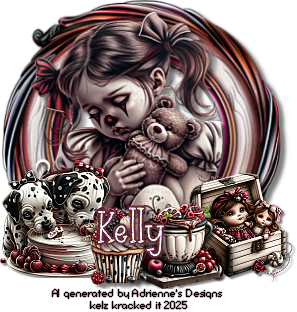
19 November 2022

This tutorial was written by me on 19 November 2022. Any similarity to other tutorials is not intentional.
Supplies:
Tube - I used the gorgeous tube called Tea Time by ViNina, which you can purchase HERE
Scrapkit - I used Tea Time by All Dolled up. You can purchase this kit from HERE.
Mask - Mask of choice
Filters - Xero Porcelain
Font of choice - My Happy Ending
Don't forget to leave some love when you download!
Let's start!
Open a new canvas 800 x 800 and floodfill white.
Copy and paste frame element 31, re-size 115%.
Click inside your frame with your magic wand, selections, modify, expand by 5. Paste paper 5 as a new layer under the frame layer, re-size 75%. Selections, invert, delete. Drop shadow the frame layer.
Drop shadow elements as you go, see my tag for placement
Copy and paste your tube, effects xero porcelain, default settings but change the softness to 12. Drop shadow.
Copy and paste element 143, re-size 70%
Copy and paste element 132, re-size 60%
Copy and paste element 102, re-size 60%.
Copy and paste element 18, re-size 60%
Copy and paste element 143, re-size 50%
Copy and paste element 44, re-size 30%
Copy and paste element 79, re-size 60%
Copy and paste element 9, re-size 60%
Copy and paste element 23, re-size 40%
Copy and paste element 35, re-size 60%.
Copy and paste element 42, re-size 30%, mirror
Copy and paste element 64, re-size 40%
Copy and paste element 3, re-size 30%
Copy and paste element 21, re-size 30%
Copy and paste element 130, re-size 15%
Create a new raster layer above the background layer. Selections, select all, copy and paste paper 4 into selection, select none. Load your mask, merge group.
Crop your tag and re-size. Add some sparkles!
Add your name and your artist's copyright and you're finished!
18 November 2022

This tutorial was written by me on 18 November 2022. Any similarity to other tutorials is not intentional.
Supplies:
Tube - I used the stunning Rose in the Dark tube by Katharine Art. You can purchase this tube at VM ARTISTS.
Scrapkit - I used a gorgeous Doodle By Design kit called Celebrando A Los Muertos. You can purchase this tube at DEEDLES AND DOODLES.
Mask - I used SophisticatSimoneMasks0273 Simone at Scrappy Bit of Fun. You can download the mask HERE
Filters - Xero Porcelain
Font of choice - Beat Drop
Don't forget to leave some love when you download!
Let's start!
Open a new canvas 800 x 800 and floodfill white.
Copy and paste frame element 5, re-size 80%.
Click inside your frame with your magic wand, selections, modify, expand by 5. Paste paper 10 as a new layer under the frame layer, selections, invert, delete. Drop shadow the frame layer.
Drop shadow elements as you go, see my tag for placement
Copy and paste your tube, effects xero porcelain, default settings but change the softness to 12. Drop shadow.
Copy and paste element 22, re-size 50%, mirror
Copy and paste element 20, re-size 60%
Copy and paste element 13.
Copy and paste element 53, re-size 40%
Copy and paste element 106, re-size 50%, duplicate, mirror.
Copy and paste element 101, re-size 50%
Copy and paste element 40, re-size 30%
Copy and paste element 56, re-size 30%
Copy and paste element 67, re-size 30%
Copy and paste element 89, re-size 45%, dupicate, mirror
Copy and paste element 59, re-size 30%
Copy and paste element 1, re-size 50%
Copy and paste element 41, re-size 40%
Copy and paste element 8, re-size 40%
Create a new raster layer above the background layer. Selections, select all, copy and paste paper 1 into selection, select none. Load your mask, merge group.
Crop your tag and re-size. Add some sparkles!
Add your name and your artist's copyright and you're finished!
12 November 2022

This tutorial was written by me on 12 November 2022. Any similarity to other tutorials is not intentional.
Supplies:
Tube - I used a beautiful Chris Pastel tube called Athena which you can purchase HERE
Scrapkit - I used the gorgeous Crisp Autumn Morn by Irish Princess Designs. You can purchase this kit from Artistic Designz, Mystical Scrap Store, Smiley Shop or Scraps and Company (Not all kits are in her store yet - Store Currently Down).
Be sure to check out Kate's blog HERE.
Mask of choice
Filters - Xero Porcelain
Font of choice - Reisling
Let's start!
Open a new canvas 800 x 800 and floodfill white.
Copy and paste frame element 8.
Click inside your frame with your magic wand, selections, modify, expand by 5. Paste paper 4 as a new layer under the frame layer, selections, invert, delete. Drop shadow the frame layer.
Drop shadow elements as you go, see my tag for placement
Copy and paste your tube, effects xero porcelain, default settings but change the softness to 12. Drop shadow.
Copy and paste element 37, re-size 35%
Copy and paste element 11, re-size 50%, mirror
Copy and paste element 39, re-size 30%.
Copy and paste element 29, re-size 15%
Copy and paste element 66, re-size 80%
Copy and paste element 131, re-size 35%
Copy and paste element 155, re-size 55%
Copy and paste element 163, re-size 40%, flip
Copy and paste element 29 again, re-size 20%
Copy and paste element 47, re-size 30%.
Copy and paste element 41, re-size 30%
Copy and paste element 50, re-size 20%
Copy and paste element 35, re-size 20%
Copy and paste element 56, re-size 15%
Copy and paste element 133, re-size 15%
Create a new raster layer above the background layer. Selections, select all, copy and paste paper 24 into selection, select none. Load your mask, merge group.
Crop your tag and re-size. Add some sparkles!
Add your name and your artist's copyright and you're finished!
03 November 2022

This tutorial was written by me on 3 November 2022. Any similarity to other tutorials is not intentional.
Supplies:
Tube - I used a gorgeous Stella Felice 7 tube which you can purchase at Picsfordesign
Scrapkit - I used a beautiful kit called Madeline which you can purchase at All Dolled Up
Mask of choice
Filters - Xero Porcelain
Font of choice - Janda QuirkyGirl
Don't forget to leave some love when you download!
Let's start!
Open a new canvas 800 x 800 and floodfill white.
Copy and paste frame element 40, re-size 136%.
Click inside your frame with your magic wand, selections, modify, expand by 5. Paste paper 1 as a new layer under the frame layer, selections, invert, delete. Drop shadow the frame layer.
Drop shadow elements as you go, see my tag for placement
Copy and paste your tube, effects xero porcelain, default settings but change the softness to 12. Drop shadow.
Copy and paste element 38, re-size 60%
Copy and paste element 41
Copy and paste element 37, re-size 80%.
Copy and paste element 47
Copy and paste element 33, re-size 45%
Copy and paste element 45, re-size 80%
Copy and paste element 143, re-size 50%
Copy and paste element 44, re-size 85%
Copy and paste element 31, re-size 65%
Copy and paste element 51, re-size 60%
Copy and paste element 17
Copy and paste element 99, re-size 40%
Copy and paste element 20, re-size 80%
Copy and paste element 33, re-size 35%
Copy and paste element 28, re-size 40%
Copy and paste element 19, re-size 25%
Copy and paste element 18, re-size 25%
Copy and paste element 153, re-size 25%
Create a new raster layer above the background layer. Selections, select all, copy and paste paper 2 into selection, select none. Load your mask, merge group.
Crop your tag and re-size. Add some sparkles!
Add your name and your artist's copyright and you're finished!
01 November 2022

This tutorial was written by me on 1 November 2022. Any similarity to other tutorials is not intentional.
Supplies:
Tube - I used a gorgeous Verymany witch tube which you can purchase HERE.
Scrapkit - I used a stunning kit called Moon Magick by Irish Princess Designs. You can purchase this kit from Artistic Designz, Mystical Scrap Store, Smiley Shop or Scraps and Company (Not all kits are in her store yet - Store Currently Down).
Be sure to check out Kate's blog HERE.
Mask - I used SophisticatSimone mask 0242 which you can download HERE
Filters - Xero Porcelain
Font of choice - Gothic Ultra
Don't forget to leave some love when you download!
Let's start!
Open a new canvas 800 x 800 and floodfill white.
Copy and paste frame element 6, re-size 55%.
Click inside your frame with your magic wand, selections, modify, expand by 5. Paste paper 10 as a new layer under the frame layer, selections, invert, delete. Drop shadow the frame layer.
Drop shadow elements as you go, see my tag for placement
Copy and paste frame element 3, re-size 65%.
Copy and paste your tube, effects xero porcelain, default settings but change the softness to 12. Duplicate the tube, and on the copy, adjust blur, gaussian blur 3. Change the blend mode to soft light. Drop shadow the original layer.
Copy and paste element 200, re-size 30%
Copy and paste element 148, re-size 25%
Copy and paste element 105, re-size 30%.
Copy and paste element 138, re-size 30%
Copy and paste element 140, re-size 30%, mirror
Copy and paste element 132, re-size 35%
Copy and paste element 144, re-size 25%
Copy and paste element 76, re-size 20%
Copy and paste element 135, re-size 15%
Copy and paste element 84, re-size 10%
Copy and paste element 19, re-size 30%
Create a new raster layer above the background layer. Selections, select all, copy and paste paper 19 into selection, select none. Load your mask, merge group.
Crop your tag and re-size. Add some sparkles!
Add your name and your artist's copyright and you're finished!
Subscribe to:
Posts
(Atom)
Snag My Blinkie

Forum I'm At!!

Blogs I Like











Subscribe


 Posts
All Comments
Posts
All Comments